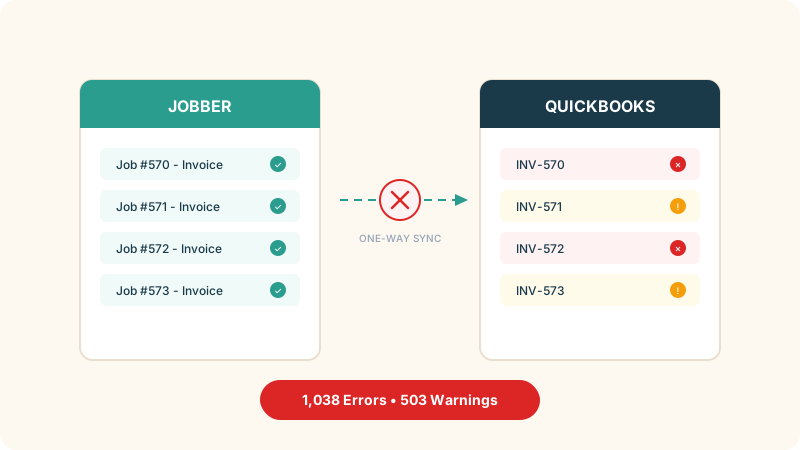
There is a screenshot floating around contractor Facebook groups that pretty much sums it up: a Jobber sync dashboard showing 1,038 errors and 503 warnings. The contractor who posted it was asking if anyone had gotten the Jobber-QuickBooks integration to actually work. Dozens of replies. Nobody had a real fix.
This is not a settings problem. Not a configuration issue that a better tutorial would solve. Jobber and QuickBooks handle data in completely different ways, and no sync layer can bridge that gap cleanly. The errors are a symptom. The architecture is the cause.
If you are a Calgary contractor staring at a sync dashboard full of red, here is what is actually happening and what your options look like.
Why the sync breaks
Jobber is a field service tool. It thinks in jobs, visits, and line items. A single job might have a quote, multiple visits, parts used on site, labour hours from three different technicians, and a final invoice, all tied to one customer and one address.
QuickBooks is an accounting tool. It thinks in accounts, categories, and journal entries. Every dollar needs a chart of accounts category. Clean debits and credits that reconcile.
Two completely different data models. When Jobber tries to push a job’s financials into QuickBooks, it has to translate between them. That translation is where things fall apart.
And the sync only goes one direction. Jobber pushes to QuickBooks. QuickBooks cannot push back. So if your bookkeeper edits an invoice directly in QuickBooks (fixes a tax rate, adjusts a line item, corrects a customer name) Jobber has no idea. Now you have two versions of the same invoice with no way to reconcile them.
That is not a bug. It is a design limitation baked into how the integration works.
The five errors you are probably looking at
Invoice number already in use
QuickBooks already has an invoice with the number Jobber is trying to create. Common when you used QuickBooks before connecting Jobber and the numbering sequences overlap.
Jobber’s fix: update your invoice numbering to start higher than the last number in QuickBooks. Fine in theory. But if you have 500 invoices backed up in the sync queue, you are resolving each collision one at a time.
Closed accounting period
Your accountant closed the books for Q1. Jobber tries to sync a late invoice dated in March. QuickBooks rejects it because the period is locked.
Jobber’s fix: reopen the period in QuickBooks, let the sync run, close it again. If you are doing this every single month, the “fix” is now a recurring chore that adds nothing to the business.
Tax rate not found
Jobber applies a tax rate that does not exist in QuickBooks. In Alberta this comes up often because GST applies to most services but some items are exempt, and the two systems categorize exemptions differently.
Jobber’s fix: create the matching tax rate in QuickBooks. But here is the catch. The warning means QuickBooks already substituted a different rate for those transactions. Your GST filing numbers might be wrong and your bookkeeper has to verify every line item to be sure.
Customer name mismatch
“John Smith” in Jobber. “Smith, John” in QuickBooks. “J. Smith Holdings Ltd.” in reality. Three entries, zero reconciliation.
Jobber’s fix: standardize names across both platforms. For a contractor with 400+ customers built up over years, that is a multi-day project that nobody has time for.
API timeout and rate limiting
Jobber’s sync hits the QuickBooks API too many times in a short window. The connection drops. Transactions queue up. When it reconnects, some sync and some do not. Errors compound.
Jobber’s fix: wait 30 seconds and retry. For 1,000 queued errors, you can do the math on how long that takes.
What this actually costs
Most contractors never add it up. Here is what the sync problem costs a 10 to 15 person company in Calgary when you do the math:
The direct labour is 2 to 4 hours per week resolving sync errors and warnings, plus 1 to 2 extra days every month end reconciling the two systems. At $45 to $60 per hour loaded cost for admin or bookkeeping time, that comes out to roughly $600 to $1,200 per month just keeping two systems talking to each other.
Then there is the stuff that is harder to measure. Your bookkeeper or accountant bills extra hours cleaning up discrepancies before GST filing. Invoices that fail to sync sometimes just never get sent. Revenue quietly slips through. And your QuickBooks financial reports are unreliable until the sync queue clears out, so decisions get made on numbers that are days or weeks old.
Every hour someone spends babysitting a sync queue is an hour they are not spending on estimates or client follow-ups.
A contractor doing $1.5 million in annual revenue who loses even 1 to 2 percent to sync related invoice leakage and error correction is leaving $15,000 to $30,000 per year on the table. That number alone covers the cost of switching to something better.
Why “just fix the integration” is not a real answer
Jobber has released multiple versions of their QuickBooks integration. The current one is better than the old one. But the core limitation has not changed: one direction sync between two systems that think about data differently.
Bookkeepers edit invoices in QuickBooks. That is what bookkeepers do. Telling them to stop and only make edits in Jobber is fighting human nature. And Jobber does not do accounting. The financials have to go somewhere else, so the sync is mandatory. Meanwhile QuickBooks does not dispatch technicians or track job progress. You need both tools, but they were never built to share data.
This is what I call the two-system tax. Two tools that are individually good at their jobs but structurally incompatible when you try to connect them.
What Calgary contractors are actually doing
The contractors who solved this did not find a better sync plugin. They eliminated the need to sync at all. Three paths I keep seeing.
Path 1: All-in-one field service platform
ServiceTitan, Housecall Pro, FieldPulse. These platforms are building invoicing and payment processing directly into the field service workflow. The job, the invoice, and the payment live in one system.
This works well for residential service companies (HVAC, plumbing, electrical, cleaning) with 5 to 30 technicians. The mobile apps are solid, customer communication is built in, and scheduling plus dispatch plus invoicing happen in one place.
The downside: most of these still have limited accounting depth. You will probably still need something for full financial reporting, payroll, and tax filing. ServiceTitan gets expensive fast, with minimum costs exceeding $2,000 a month. And per user pricing on Housecall Pro and Jobber ($29 per additional user) adds up when you are hiring seasonal crews. Migrating years of customer data and job history out of Jobber is also not trivial.
| Platform | Starting Price | Best For | Accounting Depth |
|---|---|---|---|
| ServiceTitan | Custom ($$$$) | Large residential service companies | Moderate - still needs external accounting |
| Housecall Pro | $79/mo | Small to mid HVAC, plumbing, electrical | Basic - QuickBooks integration available |
| FieldPulse | $99/mo | Growing contractor teams | Moderate - invoicing and payments built in |
| Service Fusion | $225/mo (unlimited users) | Mid-size teams wanting flat-rate pricing | Moderate - QuickBooks integration available |
| Workiz | $198/mo | Multi-trade service companies | Basic - needs external accounting |
Path 2: Modular ERP (one database for everything)
Instead of connecting two specialized tools, use one platform that handles jobs, invoicing, inventory, and accounting natively. When the invoice gets created from a completed job, it is already in the accounting ledger. No sync needed because it is the same database.
Odoo, Acumatica, and SAP Business One all work this way. The field service module and the accounting module share the same data because they are part of one system.
This tends to be the move for contractors doing $1M+ in revenue who need job costing, inventory tracking, and proper financial reporting all in one place. Construction, mechanical, and industrial service companies in Calgary gravitate toward this path.
The tradeoff is real though. Implementation costs run $15K to $75K depending on scope. The learning curve for field crews is steeper than Jobber or Housecall Pro. Mobile apps exist but they are not as polished for on site technicians. And a poorly implemented ERP is worse than a spreadsheet. You need someone who knows what they are doing to set it up.
One thing worth knowing: Odoo recently merged its Field Service module into the Planning app in version 19. The features still exist but they are accessed differently. If you are evaluating Odoo specifically, confirm the current module layout with whoever is quoting the implementation.
Path 3: Keep Jobber, drop QuickBooks
Some contractors go the other direction entirely. Keep Jobber for everything field related and either replace QuickBooks with something that integrates better, or just accept that Jobber handles invoicing and payments well enough that the bookkeeper only needs an export once a month rather than a live sync.
This works for small teams, under 10 people, where Jobber runs the daily workflow well and the accounting is straightforward. Jobber Payments handles credit card and ACH processing directly. Minimal disruption, the team keeps the tool they already know.
The limitation: Jobber is not accounting software. Bank reconciliation, journal entries, and proper financial reporting still need to happen somewhere. This approach holds up for simple operations but starts to crack as the business grows.
How to decide
This depends more on company size and complexity than on which software brand sounds best.
If you are a solo operator or running a 2 to 3 person crew, honestly just keep Jobber and QuickBooks. Accept the occasional hiccup and budget 30 minutes a week to fix errors. The cost of switching is not justified at this scale.
At 5 to 15 employees with a single trade, the two-system tax starts to actually hurt. The monthly labour cost of fighting sync errors ($600 to $1,200) now exceeds what a better system would cost you. Worth evaluating Housecall Pro or FieldPulse to reduce the QuickBooks dependency, or a lightweight ERP if your pain is more about financials than field ops.
At 15 to 50 employees, especially multi-trade or multi-location, the sync problem is likely running you $15,000 to $30,000 a year in labour, errors, and invoices that fell through the cracks. A proper implementation pays for itself within 12 months at this size.
At 50+ employees, you should not be syncing Jobber and QuickBooks. Period. The question at that point is which platform and how to migrate without disrupting jobs that are already in progress.
Alberta-specific factors
A few things that generic software comparisons never cover but matter here:
Alberta has no provincial sales tax, so most transactions are GST only at 5 percent. Sounds simple until you hit the exemptions. Some services and materials get different tax treatment. When Jobber and QuickBooks disagree on which GST rate applies, the sync creates warnings that your bookkeeper has to manually verify before filing. One system, one tax engine, no disagreements.
Seasonal hiring changes the math on per user pricing. Many Calgary contractors scale from 8 to 25 employees between March and October. At $29 per user per month on Jobber, your software bill swings by almost $500 a month just from seasonal crew changes. Flat rate platforms like Service Fusion ($225 a month for unlimited users) or ERP systems with fixed licensing handle this better.
WCB compliance is another consideration. Alberta’s Workers Compensation Board requires specific record keeping for field crews, and any system switch needs to account for time tracking and safety documentation that feeds into WCB reporting.
And if you run multiple entities (a holding company plus one or more operating companies, which is common among larger Calgary contractors) QuickBooks handles that poorly. Jobber does not handle it at all. A proper ERP earns back its implementation cost in the first month for multi-entity operations.
Where to start
If you are staring at sync errors right now, a few things worth doing before you talk to any vendors.
First, add up what the current setup is costing you. Hours per week on sync errors, extra time at month end reconciling the two systems, bookkeeper cleaning up discrepancies. Multiply by your loaded hourly rate. That number is the baseline. Any replacement needs to come in under it.
Second, figure out what actually hurts most. Is it the sync errors? The fact that you cannot get reliable financial data in real time? The per user costs climbing as you hire? The answer points you toward the right path.
Third, talk to contractors who already switched, not vendors. Every software company will tell you their platform fixes everything. Ask in local groups like Calgary HVAC and Plumbing Contractors or Alberta Construction Network for honest experiences from businesses that look like yours.
Fourth, do not rip and replace during busy season. Plan the migration for November through February when job volume is lower and the team has time for training. Switching mid-summer when every technician is running five jobs a day does not end well.
And get at least three quotes that include total cost of ownership. Not just the monthly subscription but implementation, data migration, training time, and what happens to the bill when you add five users next spring. The cheapest monthly number is rarely the cheapest total cost.